Where can I find my account number in Digital Banking?
From your Dashboard, click on the account and then click the eyeball icon underneath the account name to reveal your account number. Please note: You will only need the digits before the dash.
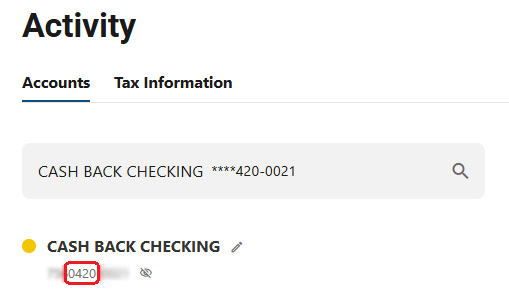

From your Dashboard, click on the account and then click the eyeball icon underneath the account name to reveal your account number. Please note: You will only need the digits before the dash.
Downers Grove
725 Ogden Avenue
Downers Grove, IL 60515
Naperville
790 Royal Saint George Drive
Naperville, IL 60563
Wheaton
625 E. Roosevelt Road
Wheaton, IL 60187


 Join
 800-323-2611
 Contact Us
 Branches & ATMs
 Pay My Loan
 Schedule Appointment